
Create the AT sub-user (WFA + WSE)
Guide for the buyer (adquirente: the company that issues the invoices). It is done only once. ARQTA uses this sub-user (sub-utilizador) to report series and invoices to the Portuguese Tax Authority (AT).
Why is it needed?
AT’s webservices do not accept your main password. A dedicated sub-user is needed, with two specific profiles:
- Perfil (profile)
WFA Webservice de comunicação de dados de faturas (invoice data reporting webservice) - Perfil (profile)
WSE Comunicação e Gestão de Séries por webservice (series reporting and management by webservice)
Step by step
Sign in and open Gestão de Utilizadores (user management)
Sign in to the Portal das Finanças with the company’s main account and open:
Fill in the new user’s details
- Utilizador (user) - already filled in with the company’s NIF and cannot be edited. Do not type anything here.
- Nome (name) - something you will recognise, e.g. ARQTA Webservices
- Senha and Confirmar Senha (password and confirm password) - keep the password; ARQTA asks for it
- Email - optional
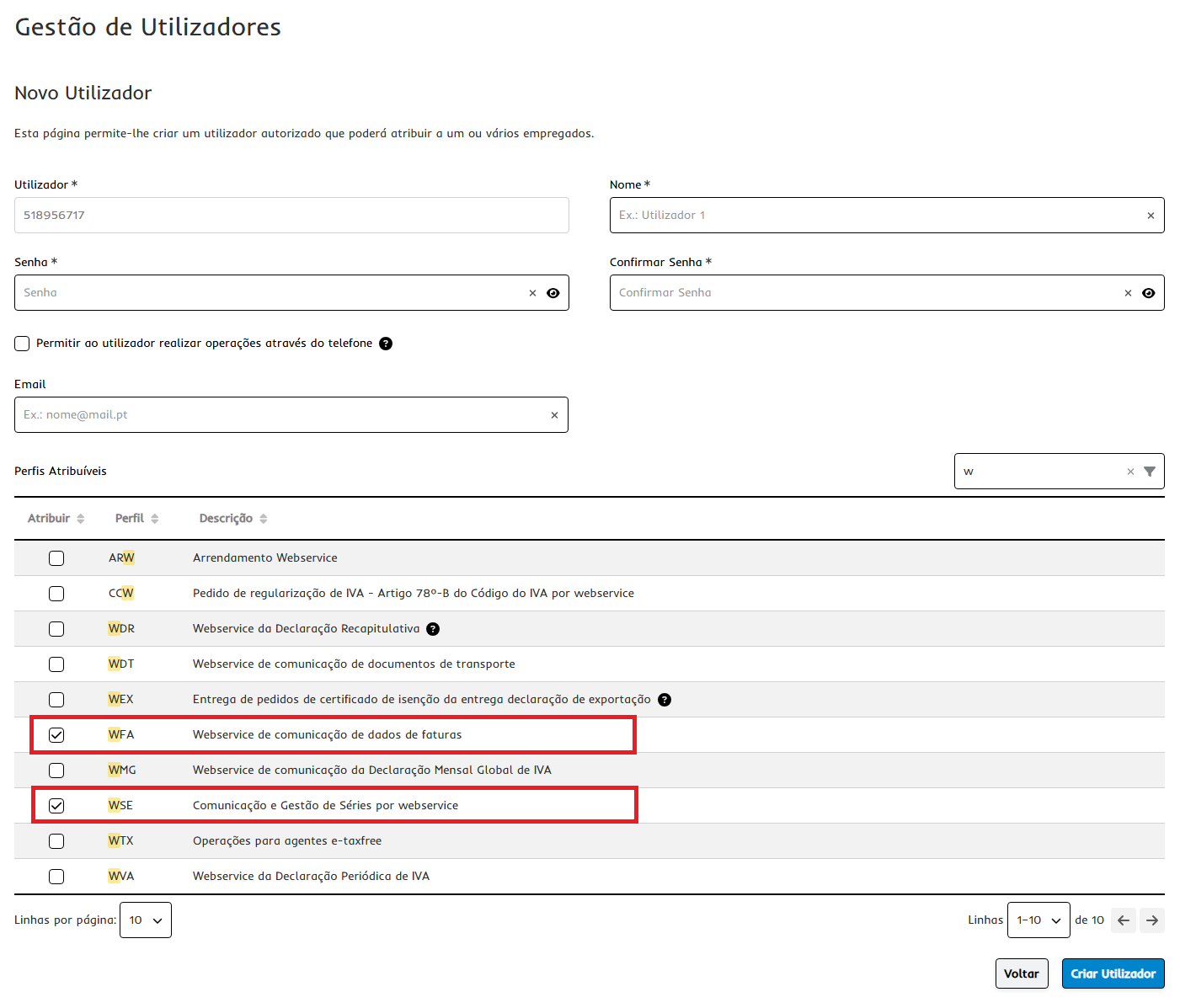
Tick the WFA and WSE profiles
In the Perfis Atribuíveis (assignable profiles) table, type w in the filter to shorten the list and tick exactly these two:
- WFA - Webservice de comunicação de dados de faturas
- WSE - Comunicação e Gestão de Séries por webservice
Click Criar Utilizador (create user).
Note the sub-user that AT generates
When the user is created, AT generates the sub-user automatically, in the format NIF/n.º (NIF/number), for example 432432543/3. You do not choose the number.
Enter the credentials in ARQTA
In ARQTA, at the AT Portal Credentials step of the setup wizard, enter:
- Sub-user number - only the number AT generated (e.g. 3)
- the password you chose in step 2
ARQTA adds the company’s NIF automatically, forming NIF/n.º. Then use Test connection to confirm that AT accepts the credentials.
What about the suppliers?
Suppliers do not create sub-users. Each supplier only registers, once, the prior self-billing agreement (acordo prévio de autofaturação) authorising your company’s NIF.
Troubleshooting
Error -16 - “User lacks permission for issuer NIF”
The supplier has not registered the prior agreement yet (or the agreement expired or was ended). Send them the supplier’s guide again.
Errors 1 to 13 (credentials)
Wrong user or password. In AT & e-Fatura → AT Credentials, check the number of the sub-user AT generated (the part after the slash) and type the password again; Test connection says whether AT accepts them before you save.
The series does not register
Check that the WSE profile is assigned and that the supplier has already registered the agreement.